Showing posts with label Web Development. Show all posts

Monday, 24 March 2014

Getting Started: Html, CSS, and PHP

Hello there, before we get started with development tutorials, i would like to clarify a few things...

I would like to assume we are all beginners that have decided to learn web development from the very basics... Here is a clarification of the normal misconceptions that comes up in the minds of beginner developers...


What is the difference between the Html and CSS?, Why do i need CSS? How do i go about learning these languages?

Here is a very basic breakdown of answers to these questions... as simple as it gets.... Using the human body as a model... lets see how they work... :-)

- Basically, Html, Hypertext Markup Language is more like a tool that allows its user to present or showcase desired data which might be text, images, forms, etc as the case may be. It also can be used to define the structure of a webpage... Relating this to our human body model, lets see Html as the human skeleton.

- CSS on the other hand, Cascading Stylesheets is like a tool that helps the user add features to the human skeleton.. your skin and its complexion, position and size of your fingers etc. It helps you style your webpages more than what a basic knowledge of Html can afford!

- Now onto PHP, Lets call this, the brain... Php serves as the brain of your webpage as it processes information and relates it back to the body framework for it to carry out its actions... Php is a programming language that can determine if your webpage is static or dynamic.

I hope we get the differences now.. Would love to hear what you think in the comments below... Thanks... and have fun coding...

Sunday, 2 March 2014

Development: Getting Started

Hey guys, its midnight here, but i would just like us to get started learning web development as we move on here... We'll be focusing more on Html (Hypertext Markup Language), Cascading Stylesheets (CSS) and Hypertext Preprocessor (PHP).

Unfortunately, we wont be going too indepth in the basics of these languages, which is why there will be download links to good books on the internet... I'll be focusing more on implementation tutorials, building web pages and giving web design tips as they come... Here are a couple of google searches to good books... Lets get started

Html: http://download.nos.org/webdesign/html.pdf
CSS: http://recursosmcc.pearsonenespanol.com/Deitel/protectuneda/additional/addnlRefs/CSS/CSS.pdf
PHP: http://tabs.stanford.edu/webworks/Winter%200405%20-%20Beginning%20PHP.pdf

A good place to get cool tutorials on any language as well is www.w3schools.com..

Have fun... and remember... Code is Poetry

Saturday, 2 November 2013

Programming Tutorials Coming Soon!

Hey guys, been a while since i was last seen here... i guess i have been tied up and it hasnt been easy...

Would have been back but it seems i have lost my touch... however i have decided to start giving out programming tutorials now as it is what i spend most of my time on these days.. we'll be doing more of Html, Css, Php, Mysql, Joomla, Android, wordpress and others as the situation may require.
I hope you guys have fun and learn as we go down the coding lane... Ciao

Friday, 2 August 2013

Popular Nigerian Forum: Naijaloaded.com Hacked

I was surfing the web as usual this morning when i decided to visit naijaloaded.com after a long absence.. Unknown to me that what i was gonna find was gonna be a big shocker... Naijaloaded had been HACKED!!!!

Here's what i saw

NAIJALOADED HAS BEEN PENETRATED BY CYBER GURU HACKING GROUP, THISDOMAIN NAME IS CURRENTLY FOR SALE, #50,000 ONCE PAYMENT IS MADE, WE WILL TRANSFER THE DOMAIN TO YOU OR GIVE YOU ITS REGISTERED EMAIL AND PASSWORDNOTETHIS OFFER WILL EXPIRE @ EXACTLY 16 OCLOCK FRIDAY 2 AUGUST CALL OUR CUSTOMER CARE
+447024022953
ADVICE DO NOT CALL TO ASK QUESTIONS U ALREADY KNOW THE ANSWERS™
@MANKIND, U CAN THREATEN THAT FOOL, BUT NOT US OK BCS WE ARE THE BEST HACKING TEAM SO FAR, BEWARE OF CYBER-GURU 2013 .....LOGGIN OUT™

Here is how the site looks now:

Friday, 26 April 2013

Winning The Exhibition: A Reward

Last week, precisely on Wednesday, the 17th of April, 2013. KYD Evolution emerged as the winner of the NACOSS (Nigerian Association Of Computer Science Students)
University of Ilorin chapter Software exhibition. The day was a remarkable one as all participants were a force to reckon with. The Exhibition covered not just software but also Web Development, Graphics and Animation and any other category from the Computer science field.

The Second runner up, Had come up with a medical expert system which he called Steady Bits Automedes. This web application helps diagnose sicknesses and diseases based on symptoms specified by the user... A cool application i must say.

The runner-up, that is the Second place was a graphical designer that majored in Photoshop designs and Maya. He presented his designs which were... in one word... Breath-taking. He designed a lot of high quality and sophisticated images. But that wasnt all... He showcased Top-class website templates and had a loud round of applause from the audience.

Now, to us.. I went with my crew, KYD Evolution Inc. and we showcased a upgraded version of a website created for the school. The website was formally just a forum that connects students of the school together from various departments. The upgraded version, this time around is no longer just a forum, it now has various tools incorporated into it.. tools like, the map of the school, GPA Calculator, shop and lots more. The Forum section was developed using SMF(Simple machines forum). The UI was upgraded and it blew minds away.


We won majorly as we were solving the problem of connectivity in the school environment, a unique concept and presentation. Besides we were competing with those in their final year while we were still in our second year. Motivated quite a number of people.

The day was a wonderful day as we felt rewarded and fulfilled.

Friday, 12 April 2013

Killing or Dying : Google Adsense

Google Adsense, the world or should i say the internet's leading advertising agency. A lot of Websites - or should i say majority -  on the web make use of Google adsense as a source of monetizing their websites or blogs. Over the last years, since its inception, Google adsense has actually made bloggers and website owners have a bigger problem.. The problem now is that they have gotten stricter and its pretty much harder to get into the program, especially blogs.. This brings me to the question...


Is Google Adsense killing bloggers or is it Dying?

What i mean by the question posed above is that due to frustrations brought about by disapproved applications into adsense, is it making bloggers change their minds about blogging (killing) or is it losing new markets to other advertising platforms like Addynamo and the likes (dying).

As a blogger, after reading multiple posts on how to get approved by adsense and basically doing everything - except using a top domain, which i would be doing after the AtoZ Challenge -.... i am still being disapproved. If not for my passion, i would have probably stopped blogging like other money-driven bloggers would. 

This question is really on my mind  and i would like to get answers. Your opinion is highly needed..

Thursday, 11 April 2013

Joomla 3.0 : Build Websites With Ease


Joomla is an award-winning content management system (CMS), which enables you to build Web sites and powerful online applications easily. Many aspects, including its ease-of-use and extensibility, have made Joomla the most popular Web site software available. Best of all, Joomla is an open source solution that is freely available to everyone.


Firstly, What is a Content Management System?

A content management system is software that keeps track of every piece of content on your Web site, much like your local public library keeps track of books and stores them. Content can be simple text, photos, music, video, documents, or just about anything you can think of. A major advantage of using a CMS is that it requires almost no technical skill or knowledge to manage. Since the CMS manages all your content, you don't have to.

Using a CMS comes with so much flexibility that you do not even need to learn how to code before you create your own website...

What Kind of Websites Can You build With Joomla?

Joomla is used all over the world to power Web sites of all shapes and sizes. For example:

  • Corporate Web sites or portals
  • Corporate intranets and extranets
  • Online magazines, newspapers, and publications
  • E-commerce and online reservations
  • Government applications
  • Small business Web sites
  • Non-profit and organizational Web sites
  • Community-based portals
  • School and church Web sites
  • Personal or family homepages
Why Choose Joomla 3.0?
Joomla 3.0, the latest release comes with a much more fluid and easy-to-use application that makes Website development much easier... Aside from all the reasons stated above, i recommend joomla if you are interested in making use of a CMS....

If you have any contradictions or questions, you can always drop a comment

Click here to download Joomla 3.0
Download

Monday, 17 December 2012

How to Mobilize Your Blog: Plugin Vs Web Platform

As everyone knows these days, it is extremely important to have a mobile friendly website. Large amounts of online traffic are migrating to mobile platforms, and you do not want to be left behind. Knowing that you need to go mobile, the biggest decision is how to do it – with a plugin or with a web platform. Each have their advantages and disadvantages, so read on for a few more details on each, to help you decide how to take your blog on the go.

Mobile Plugins
Mobile plugins are generally offered through your web host, or, you can seek out a third party. It essentially offers you the opportunity to install a plugin on your website that automatically converts it to a more mobile-friendly format when someone navigates to your site on a mobile device. Plugins are extremely easy to use, and do not require any kind of knowledge of computer code and programming. Plugins save you time and money, as there are many free downloadable plugins floating around on the Internet. And, of course, you do not need to spend the time to redesign your website. Once the plugin is installed, any mobile visitor is automatically sent to a reformatted page.

Of course, when using a plugin you lose the control available for those who custom design their mobile sites. Depending on what your blog offers, that might not be a problem – if you have a rather basic design that just needs a slight reformatting for mobile, it might not be worth your time to do a custom redesign of your whole website. But, for others, you might want more control over the final look of your mobile edition. And those are the people who will want to use a web platform to design their mobile sites.

Web Platform
Web platform offers a lot of advantages not available to those using a plugin. The obvious one, of course, is customization. This means that you have the ability to customize each and every aspect of your mobile site, whereas a plugin will just apply your web content to a standard template. This customization will allow you to ensure that the mobile version of your site is the best possible format for your viewers and customers, and allows you to ensure that your look, style, and brand identity carry over fluidly from your main site.

The drawbacks to custom design are the time and expense involved. If you do not know how to do it yourself, you will need to hire a professional, and even if you can, it will take quite a bit of time. Plugs and web platform both have their benefits and drawbacks, so spend some time considering your needs and resources before determining a path! Check out TradeStable mobile to get an inspiration. Good luck!
Mary Johnson
Author - Mary Johnson. Mary is a freelance writer specializing in tech-related articles. With a background in journalism, she has been in collaboration with many blogs across the Web. Currently Mary is working for TradeStable.com.ng. Follow on Twitter @MaryJohnson083

Wednesday, 28 November 2012

How To Embed Youtube Videos in a BlogPost

As a blogger, there are posts that will require one or two videos to be added to the blog post in order to add more meaning or make the user understand the blogpost fully. Most bloggers do not know how to do this so i'll be covering how in the next few steps.

STEP 1: Go to the page containing the video you would like to have embedded into the blogpost. This can be a Youtube video or any other video embedded in any other website.

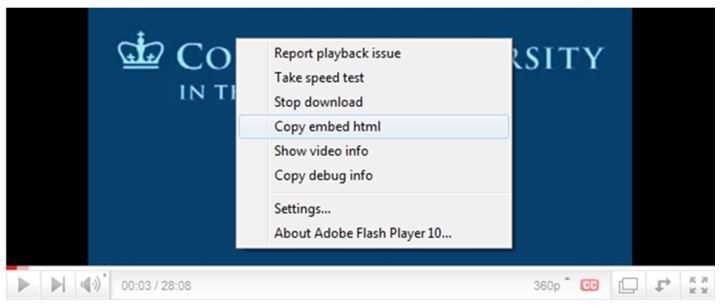
STEP 2: Right click on the video and select "Copy Embed HTML" as shown in the picture below. 
How To Embed Youtube Videos in a BlogPost

STEP 3:  Go to the blogger post, Switch to HTML view, Right click and select Paste or just press Ctrl + V.

Thats that. You now have a video embedded in your blog post


Monday, 12 November 2012

Create A Stylish 404 Error Page

As usual, i was surfing the internet and i came across this useful post by a friend and fellow blogger, Durodola Ridwan, a blogger at http://www.realcombiz.com. He spoke about how to create custom blogger 404 error pages and i felt the need to share it with you guys. As we all know, the default error page appears in only plain text surrounded by a grey box which look so much ugly, so he has created two awesome 404 error page which will override the existing style sheet for the error page.

404 ERROR STYLE 1


STEP 1

  • Go to your blogger dashboard
  • Click on "Design" > "Edit HTML" (Old blogger interface)
  • Click on "Template" > "Edit HTML" > "Proceed" (New blogger interface)
  • Use ctrl F to find ]]></b:skin> and paste the following code after/below ]]></b:skin>
<b:if cond='data:blog.pageType == &quot;error_page&quot;'>

<style type='text/css'>

.status-msg-wrap {

    font-size: 100%;

    margin: none;

    position: static;

    width: 100%;

}

.status-msg-border {

    display:none

}

.status-msg-body {

    padding: none;

    position: static;

    text-align: inherit;

    width: 100%;

    z-index: auto;

}

.status-msg-wrap a {

    padding: none;

    text-decoration: inherit;

}

.RB-404-box {

  background:#FFFFFF;

  width:98%;

  margin:10px 0px;

  padding:20px 10px;

  border:1px solid #ddd;

  -moz-border-radius:6px;

  -webkit-border-radius:6px;

  border-radius:6px;

  box-shadow: 5px 5px 5px #CCCCCC;

}

</style>

</b:if>
Simply edit #FFFFFF if you want to change the background colour of the box and click Save template.

 STEP 2

  • Now go to "Settings" > "Search preferences" 
  • Click on Edit link next to Custom Page Not Found
  • Copy and paste the following code in the content box
<!-- 404 Error Page By www.realcombiz.com -->

<div class='RB-404-box'>

  <p align='center'><span style="color: red; font-family: 
Georgia, 'Times New Roman', serif;"><span style="font-size: 150px;
 line-height: 
18px;"><b>404</b></span></span></p>

  <p align='center'><span style="color: #0080ff; font-family: 
Georgia, 'Times New Roman', serif;"><span style="font-size: 150px;
 line-height: 18px;"><b><br 
/></b></span></span></p>

  <p align='center'><span style="color: #0080ff; font-family: 
Georgia, 'Times New Roman', serif;"><span style="font-size: 150px;
 line-height: 
18px;"><b>Error</b></span></span></p>

  <p align='center'>

<br />

  <p align='center'>

<br />

  <p align='center'>

<b><span style="font-size: x-large;">Page Not Found!!!</span></b></p>

<br />

  <p align='center'>

<a href="LINK TO YOUR HOME PAGE"><img border="0" 
src="https://blogger.googleusercontent.com/img/b/R29vZ2xl/AVvXsEiAx_MFTGTo7yyTopRrAXuOxCHotebFzWYebrNAa5VzRzLWHa56Fj6RzKsvigq_Xn9pkZrqXCXCFQb_f8fs_9PxlhxFpfySu6Z7YkHdQAcB3wgx00QRp45JCMzkNQCGgna92kCVgioR01wb/s1600/home+button+2.jpg"
 /></a>

<a href="LINK TO YOUR CONTACT PAGE"><img 
border="0" 
src="https://blogger.googleusercontent.com/img/b/R29vZ2xl/AVvXsEg2bebs_vAceCjjl7J5mKGU2Y11_r7KrwAeyqVk3nzH6Cj8T7OiuIpEwH0-ewChBO1Uw9wyhfnOISKiLdCglKLwPJH-RBrf4vIZVBoWt8rX4FkiLPWpvLsWl8I1TTujmjKPtpLT4BbKhADu/s1600/contact+button+2.jpg"
 /></a></p></div>  
Click on Save changes.

404 ERROR STYLE 2

 STEP 1

  • Go to your blogger dashboard
  • Click on "Design" > "Edit HTML" (Old blogger interface)
  • Click on "Template" > "Edit HTML" > "Proceed" (New blogger interface)
  • Use ctrl F to find ]]></b:skin> and paste the following code after/below ]]></b:skin>
<b:if cond='data:blog.pageType == &quot;error_page&quot;'>

<style type='text/css'>

.status-msg-wrap {

    font-size: 100%;

    margin: none;

    position: static;

    width: 100%;

}

.status-msg-border {

    display:none

}

.status-msg-body {

    padding: none;

    position: static;

    text-align: inherit;

    width: 100%;

    z-index: auto;

}

.status-msg-wrap a {

    padding: none;

    text-decoration: inherit;

}

.RB-404-box {

  background:#FFFFFF;

  width:98%;

  margin:10px 0px;

  padding:20px 10px;

  border:1px solid #ddd;

  -moz-border-radius:6px;

  -webkit-border-radius:6px;

  border-radius:6px;

  box-shadow: 5px 5px 5px #CCCCCC;

}

</style>

</b:if>  
To change the background colour, then edit #FFFFFF.

STEP 2

  • Now go to "Settings" > "Search preference" 
  • Click on Edit link next to Custom Page Not Found
  • Copy and paste the following code in the content box
<!-- 404 Error Page By www.realcombiz.com -->

<div class='RB-404-box'>

  <p align='center'><font color='#b60000' style='font-size: 
160px'><strong>404</strong></font></p>

  <p>&#160;</p>

  <p align='center'/>

  <p align='center'><font size='5'>Page Not Found!</font></p>

  <p style='line-height: 30px'><strong>

<font color='#ff0000' size='5'>

Whoops!

</font> <font color='#666666'>

Looks like you either clicked a broken link or a Page that no more exits. Kindly do one of the followings:

</font></strong></p>

  <ol style='line-height: 25px'>

    <li><a href='javascript:history.go(-1)'>&#171; Go Back</a> </li>

    <li>Report the Problem to us by Clicking <a 
href='http://www.realcombiz.com/p/contact_13.html'>Clicking 
here</a>&#160;&#160;&#160; (<em>This will help 
us serve you even better</em>) </li>

    <li>Go To Homepage by <a href='http://www.realcombiz.com'>Clicking Here</a>

      </li>

  </ol></div>  

Click Save changes, and you are done. To confirm that the error is working, simply type a page that does not exist on your blog like http://www.yourblogurl.com/anytexthere.

We'll working on bringing you more custom 404 error pages.So if you have any suggestions as to what the pages should look like, then drop them in the comments box

Saturday, 27 October 2012

KYD Evolution Launches Unilorites.com

After a couple of weeks working on this project, it has finally been unveiled to the general public today, 27th of October. The Unilorites website at http://www.unilorites.com is now open to registration. The website that is basically centered on the world of the University of Ilorin, Nigeria. The students, graduates, and every other person interested in getting cool stuffs and info about the school are all invited. Although to access the website, one must register.
MORE ON THE WEBSITE
The website was built using the Simple Machines Content management system for building forums, SMF. Using a cool Firebrick template that has undergone a little modifications in the right places.
Unilorites.com is currently undergoing a test run, in order to inquire what unilorites want and what features they would love to have on the site.

The Major features of the website include:.
  • The ability of users to choose from four different themes with unique layouts.
  • A shop feature where the user can acquire a couple of tools to make their stay more comfy.
  • Ability to rate posts and also share them over social medias including Facebook and twitter. 
These and many more are cool things that unilorites are gonna benefit from by using unilorites.com.

Unilorites was purposely released today to celebrate the birthday of  the AceKYD. 
Happy Birthday Ace. 

Greatest Unilorite!!!

Wednesday, 17 October 2012

HOW TO CHANGE DEFAULT FAVICON IN BLOGGER.

KYD Evolution: HOW TO CHANGE DEFAULT FAVICON IN BLOGGER.
A favicon (Favourite icon) is the small image you see in the title bar of your browser when viewing a website or blog. Most of the time, the logo of the website is used as the favicon. Having your own customized favicon instead of the default blogger favicon is a good way to send that unique message out to your followers and readers and also to get visitor's attention. A favicon is necessary as it server as the finishing touch needed to portray the design and identity of a great looking blog.
STEP 1: Go to your blogger's dashboard >> Layout. You would be presented with the layout of your entire blog, your widgets position e.t.c. 
Step 2: Click on the edit link on the "Favicon" block with the default blogger logo on it. A new window should pop-up, where you can now browse for an image in your computer to choose as your new favicon.
Step 3: Click on the "Choose File" button and search for your already created favicon in .ico format, then click on save.
NOTE: .ico is a picture format just like the .jpg and .png picture formats that is specifically used for icons. Read our post on <a href="">How to create a favicon using photoshop</a>. 
Step 4: Now you should see your own favicon instead of the default blogger favicon. You can also use these methods to change your favicon at a later time.

Tuesday, 16 October 2012

COOL TIPS FOR CUSTOMIZING YOUR BLOGGER TEMPLATE.

COOL TIPS FOR CUSTOMIZING YOUR BLOGGER TEMPLATE.
The look and feel of a blog is equally as important as quality content being added to the blog on a regular basis. As a blogger, if you are as inquisitive as i am with how i can perfect how my blog looks and make it match my taste. Then i think this post should be helpful.

1. Choosing a custom Template

Aside from the default templates that came with blogger, it is highly recommended but not obligatory that one goes deeper into the blogosphere in search of templates that can redefine your blog. Check out our tips on how to choose a perfect template here. Google is a good place to start searching but here are some cool websites that you can get blogger templates from. www.bloggertricks.com etc.

2. CUSTOMIZING THE TEMPLATE FEATURES

If you are still using one of the default blogger templates, then you are in luck as blogger presents the opportunity for one to easily adjust widths, colours, and loads of other stuffs in a graphical user interface. To make use of this great tool, Go to Dashboard >> Templates >> Customize and explore the world of possibilities at your fingertips.
On the other hand, when you've upgraded to a more professional feel ;-), i mean when you are now using custom templates, the above mentioned procedure will not be useful as blogger will not be able to edit the custom templates automatically. In other words, you have to do your customizations and edits manually by going to Dashboard >> Templates >> Edit Html >> Proceed and then check the "Expand widgets" box. If you are familiar with Cascading Style Sheets (CSS) then this should be a walkthrough for you. Whenever i wanna edit a particular area in my blog, i make use of the "Inspect Element" feature that comes with browsers. To use this, i visit the page of my blog that contains what i wanna edit, right click on it and select "inspect element". From there, i can see the properties acting on that area.
A great took for this is Firebug in Mozilla Firefox. You can download FireBug here. With Firebug, you can easily trace which value or element is responsible for the action you want to perform. Firebug also allows you to preview your edits without refreshing the page. Awesome right??? Once you get the elements you want to edit, it's now easy for you to go to your dashboard, find the code and replace it with your desired value. Catch you guys later.

Wednesday, 3 October 2012

CHOOSING THE PERFECT TEMPLATE FOR YOUR BLOG


KYD Evolution
More and more blogs are being created day by day, some withstand the test of time while some wither and die or just fade away. To prevent your blog from fading away, obviously you’ve got to provide quality and great content. Despite the importance of content, the look and feel of a blog also helps a lot in attracting
followers and having them always come back for more.

As one is new to the blogosphere, you feel satisfied with the default blogger templates. But as time goes on, you discover other blogs with cooler templates and the need to have a nice look for your blog. There are thousands of awesome templates out there and if you do not have a clear view of what you want, you’ll simply be faced with indecision or end up making the wrong choice.
In this post, I’ll be giving you some tips in choosing a blog template that suits the topic of your blog. I, as an individual, have tried out quite a number of blogger templates till date before I finally settled with the current one. Here are a few things I took into consideration:

1. What is the purpose of your blog or what niche are you targeting
KYD Evolution: Purpose
Is your blog a technology blog, a fashion blog, music, entertainment, gossip, lifestyle or any other specific category? By identifying your niche, you are a step closer to choosing that killer template.

2. What kind of message do you want to send?

By following the first step above i.e. identifying your niche, you already have an insight as to what you want your blog to look like. Do you want it to have a
formal, semi-formal or casual feel? You could also pick a color that you’ll prefer it to be. A 2-columned blog, 3-columned etc. Noting down these little details,you should already have a clear picture of what you want.

As long as you’ve followed the steps above, and you’ve got your jottings, selecting that perfect template will be far much easier and you’ll surely choose one that has the exact look and feel that your blog needs.
Follow these steps and I can assure you that you’ll definitely appreciate it.

Friday, 21 September 2012

How To Add A Favicon To Your Webpage.

KYD Evolution: Favicon
As a beginner web designer or developer, you discover the need to add a favicon to your webpage or website, but you are facing difficulty in doing so. Well, here's the trick. But first, what exactly is a favicon? A favicon is a small image or icon in .ico that is shown on the title bar beside the Title of a webpage or website. The favicon serves as a sort of identity for websites and webpages. To get a favicon,
you'll need to create an icon using any graphics software. To find out how to create an icon with photoshop, click here.
Enough of the story, lets find out how to implement this.
To add a favicon to a static or simple html web page, go to where the <head> tag is and add after it,
<link rel="shortcut icon" href="link to favicon"/>
But you might also be faced with difficulty if your webpages are quite a number. Lets say you are building a big website, you won't want to add this code manually to every page, rather, you'll make use of the template file of your site. A template is mostly
written in .php format for websites and it contains files and codes that are required on every page of the website. As this is mostly written in php, this is how to add favicon to a php document or page:
Add this code before the main contents of your php file
echo '<link rel="shortcut icon" href="your favicon location"/>';  
Thats all, and you've got yourself your favicon. Don't forget to share
Related Posts Plugin for WordPress, Blogger...
 
Blogger Widgets Twitter Bird Gadget