Showing posts with label Internet Tips. Show all posts

Friday, 2 August 2013

Link Facebook to Twitter easily

Hey guys, i noticed recently that some of us still dont know how to link our facebook pages to our twitter accounts. Doing this has many advantages which is why i strongly recommend it.. You can now easily link your personal Facebook account to your Twitter account, and publish your “public” status updates directly to Twitter.
Here’s how to do it.
- Choose your personal Facebook account and then click “Link to Twitter”
- Choose which items you’d like to send to Twitter, of course they’ll have to be marked as “Public” for them to be shared.
Facebook to Twitter 1 520x373 Anyone can now link their Facebook profile to Twitter. Heres how
Here’s what a Tweet directly from a Facebook public status update looks like. The link goes right to the destination, rather than through Facebook.
tweetdrew2 Anyone can now link their Facebook profile to Twitter. Heres how
There you have it, now you can easily and seamlessly send your public Facebook status stream to Twitter, automagically.

Popular Nigerian Forum: Naijaloaded.com Hacked

I was surfing the web as usual this morning when i decided to visit naijaloaded.com after a long absence.. Unknown to me that what i was gonna find was gonna be a big shocker... Naijaloaded had been HACKED!!!!

Here's what i saw

NAIJALOADED HAS BEEN PENETRATED BY CYBER GURU HACKING GROUP, THISDOMAIN NAME IS CURRENTLY FOR SALE, #50,000 ONCE PAYMENT IS MADE, WE WILL TRANSFER THE DOMAIN TO YOU OR GIVE YOU ITS REGISTERED EMAIL AND PASSWORDNOTETHIS OFFER WILL EXPIRE @ EXACTLY 16 OCLOCK FRIDAY 2 AUGUST CALL OUR CUSTOMER CARE
+447024022953
ADVICE DO NOT CALL TO ASK QUESTIONS U ALREADY KNOW THE ANSWERS™
@MANKIND, U CAN THREATEN THAT FOOL, BUT NOT US OK BCS WE ARE THE BEST HACKING TEAM SO FAR, BEWARE OF CYBER-GURU 2013 .....LOGGIN OUT™

Here is how the site looks now:

Wednesday, 31 July 2013

Data Protection - Are You Cavalier?


KYD Evolution's Blog - Data Protection

Flouting the Law
Have you read the Data Protection Act 1998 recently? You know if you carry out business in the UK you really should. Did you know that not to fall foul of the Data Protection Act you should amongst other things be aware of the following?:

·         Encrypt any personal information held electronically that would cause damage or distress if it were lost or stolen.
·         Consider whether the content of emails should be encrypted or password protected.
·         If you send a sensitive email from a secure server to an insecure recipient, security will be threatened. You may need to check that the recipient’s arrangements are secure enough before sending your message.

If you currently do none of these things then you are flouting the law and are acting rather cavalier with the data you hold. Continuing to do business in this way could lead to you becoming the next newspaper headline. Apart from the direct financial implications this could have, consider the in-direct cost and loss of reputation.

Getting Legal
As a responsible business you will need to deploy some encryption software. In fact it’s far stronger than that! If you want to be legal you will need to deploy some encryption software. Now before you throw your hands up in the air and shout “but what about the expense and do you know how complicated that would be”, think again. Modern email and file encryption software has come a long way in the past three or four years. The act of becoming legal in this regard should result in virtually no change to your existing processes.

First Things First
Before you rush out and grab the first product that offers you low cost easy encryption, take stock of the complete landscape. Do you need to protect data at rest, on mobile devices as well as when contained in an email? The chances are that you do. This will narrow the field considerably. One prime contender will be Egress Switch. I have had first hand experience of this product and found that it ticked all of my boxes.

Things To Look For
When selecting your solution there are a number of major ticks you want in the box;

·         Independent certification of the something like FIPS or CAPS approval
·         Simple one or two click operation
·         Integration with existing architecture, spam, virus and content filters
·         Allows free use by non subscribed recipient
·         Ability to access secure data anywhere on iPhone, iPad, Blackberry and Android.
·         Ability to encrypt files on hard drives, thumb drives and CD-ROMs
·         Ability to set enterprise wide policy regarding what is to be encrypted when leaving the network
·         Audit trail of what has been sent and received

Comfortably Numb

When you have found the right product for you and successfully deployed it you will have that warm comfortably numb sensation of being legal at last. Doing nothing about complying with the Data Protection Act is not an option. Securing your data should be a no brainer!


Paul Simms is an Internet marketing expert with a keen interest in email and cyber security issues. Paul is Sales & Marketing director for one of the UK's leading full service marketing agencies, Reflect Digital. Follow on Google+ or Twitter

Saturday, 20 April 2013

Reduce The Number Of Mails Gotten From Twitter

As you get more followers on twitter, its no news or surprise that the mails gotten from twitter in your email is bound to increase. You get mails for each mention, retweet, favourite, followed and every other thing you get mail for.

Most of this mails end up clogging your inbox so the best thing to do is to prevent twitter from sending them. To do this, follow the instructions below:

STEP 1: Login to your twitter account and navigate to your settings... After logging in you can click on this url
https://twitter.com/settings/notifications

STEP 2: Check the respective boxes for the alerts you would like to receive and uncheck those you are not interested in.

Your email now has a reduced number of mails gotten daily from Twitter

Thursday, 18 April 2013

Profile Merging On Facebook

Its amazing the kind of work the Facebook developers are doing... Its becoming a normal thing to see a few upgrades at least once in a week to either the mobile or PC view. Some of these changes or should i say upgrades are extremely remarkable. I noticed one today, probably not new, which led to the writing of this post.

The title, "Profile merging" here, sounds pretty exciting and what it really does is it merges two people's profile, and displaying stuffs they have in common. Here's a preview of what i mean:


1. Image Combination

As you can see... the profile picture of the two, individual profiles were merged to get the new one.

2. Related Data

It displays information that we have in common, Location, School and the likes.

3. Address Bar Combo

The Address bar being merged allows you to view your combination with various people.. All you have to do is change the usernames to the ones you would like to combine.. E.g
"https://www.facebook.com/FirstUsername?and=SecondUsername"


4. Common Items

This section covers the Friends you have in common, pictures, page likes and events.

Pretty Slick huh?

Friday, 12 April 2013

Killing or Dying : Google Adsense

Google Adsense, the world or should i say the internet's leading advertising agency. A lot of Websites - or should i say majority -  on the web make use of Google adsense as a source of monetizing their websites or blogs. Over the last years, since its inception, Google adsense has actually made bloggers and website owners have a bigger problem.. The problem now is that they have gotten stricter and its pretty much harder to get into the program, especially blogs.. This brings me to the question...


Is Google Adsense killing bloggers or is it Dying?

What i mean by the question posed above is that due to frustrations brought about by disapproved applications into adsense, is it making bloggers change their minds about blogging (killing) or is it losing new markets to other advertising platforms like Addynamo and the likes (dying).

As a blogger, after reading multiple posts on how to get approved by adsense and basically doing everything - except using a top domain, which i would be doing after the AtoZ Challenge -.... i am still being disapproved. If not for my passion, i would have probably stopped blogging like other money-driven bloggers would. 

This question is really on my mind  and i would like to get answers. Your opinion is highly needed..

Wednesday, 3 April 2013

Create a Basic Menu in Blogger Now

After receiving a couple of Facebook messages and emails from fellow bloggers, mostly new bloggers asking questions on how to go about implementing a menu on their blog. This has prompted me to write this post. Creating a basic menu in blogger is pretty easy as adding a new gadget... So lets get started...

STEP 1: Create all the pages you need or that you would like to appear on the Menu... To learn how to create a custom page, Click here
STEP 2: Now navigate to Dashboard > Settings > Layout. You should have something similar to the image below.


STEP 3: Click on the Add a Gadget link just above the Blog Posts section...
STEP 4: In the Add a Gadget popup window that comes up, scroll down to find, the pages gadget.

NB: If you already have the Pages gadget added to your blog, Just drag the Pages gadget column up to the top under the header... And you have your menu. Otherwise continue with the steps below.

STEP 5: After Selecting the pages gadget, you would be redirected to a page where you can customize the look and feel... Click save and you've got your menu bar...

NOTE: The gadget must be under the header gadget or above the Blog Posts to work and not sideways... Your end result should be something similar to this

Dont forget to drop suggestions, questions or comments in the comment box below. thank you

Tuesday, 2 April 2013

Create A custom Page in Blogger

Custom pages in blogger are often necessary at times. Especially when you have offers or give-aways. A custom page allows you to have a specific platform to carry out desired tasks..For example, writing an "About Us" or Privacy policy... Your choice... Here's a rundown of how its done...

STEP 1: Navigate to Dashboard > Pages. Click on the new page button.. A drop down will appear as in the image below \
Here you have two options, either creating a blank page which would be a location in your blog... or a Web address which would most likely contain an already created web page from an external source.

STEP 2: If you would like to add a page with fresh content to your blog, then select Blank page. You would be redirected to a page where you would input page title, Content (Content can also be written in HTML format) and other settings. Otherwise Click on Web Address, and you would be asked to input the title and address of the external source you would like to link to..

Save and you've got yourself a custom page.

Backup Your Blog Before its too late

Hey guys, i was going through blogs participating in the A-Z Blogging challenge to see how things were going or learn new things only to come across a friend, +Michael Abayomi's blog, that was almost lost due to reasons only best known to blogger.. This situation spiced me up to write this post on how to backup our blog before its too late.. Lets get started....


STEP 1: Go to Settings, and then move on to the Other tabs

STEP 2: Now click on the Export blog link as shown in the image above... A dialog box should appear as in the image below

Clicking on download above will let you save your blog in a .xml format can be used to move your blog to another blogging platform or also to retrieve your blog posts in case of any incasity, like we say in Nigeria..

It is recommended that the often you blog, the often you back up... 

Friday, 22 March 2013

How To Delete Your Blog on Blogger

There are times when we are actually fed up with a particular blog or a situation where you have multiple blogs and would like to streamline them down to as few as posssible.. This tutorial covers how to delete any unwanted blog on Blogger.. Lets get started..

Step 1: Go to Settings in your blogger dashboard.
Step 2: Under Settings, click on "Others" to go to the others tab.
Step 3: Under the Other tab, Click Delete blog... A confirmation box will appear and select Delete Blog...

Thats all....

Monday, 18 February 2013

Use Your Gmail Offline - Without Internet

Gmail offline allows us to read, respond to, and search without network access. So even if you are offline, you can open your web browser, go to Gmail.com and get to your mail just like you are used to.


Click here to Install offline Gmail


How to start Offline Gmail
  • After installing, open a new tab in Chrome.
  • In the new tab panel you will see a Gmail Offline Icon
  • Click on the Icon, and then Offline Gmail will load.
  • Now you can keep reading mails and also any new messages you compose will be sent out the next time you connect to internet.
Note: This is only available in Google Chrome.

Monday, 14 January 2013

How To Download Videos From Youtube Easily in Any Format

Downloading videos from Youtube or any other video sharing website has been one of the many difficulties some happen to face using the internet. Here's a post on how to download Youtube videos using IDM.

In this tutorial, i'll be showing you a much easier way to download these videos from any video sharing website like Metacafe, Ted etc. Just follow the steps below to find out how to do this.

STEP 1: You must have Java Runtime Environment installed on your system to be able to use KeepVid as it makes use of Java applets. If you do not have JRE(Java Runtime Environment) installed, then click here to download it.


STEP 2: Go to the website you want to download the video from, say Youtube and copy the video Url.
STEP 3: Go to www.keepvid.com and paste the url you copied into the text field and click on download. Step 4: Wait for the Java applet to finish loading and now you'll be able to download your files in various formats available. Including 3gp, mp4 etc.

Which websites does KeepVid support?
Dailymotion, 4shared, 5min, 9you, AlterVideo.net, Aniboom, blip.tv, Break, Clipfish.de, Clipser, Clip.vn, CollegeHumor, Cracked, Current, dekhona.com, DivxStage.eu, eHow, eBaumsWorld, Ensonhaber, Facebook, Flickr, Flukiest, FunnyJunk, FunnyOrDie, FunnyPlace.org, Metacafe, MySpace, Ning, Photobucket, RuTube, SoundCloud, Stagevu, TED, Tudou, TwitVid, VBOX7, videobb, VideoWeed.es, Veoh, Vimeo, zShare.net.

Enjoy!!!

Monday, 7 January 2013

Search and Get PSD Graphics For Free Online

One of the most important ingredients of cool graphics and also websites that graphical designers use are PSDs. PSDs are already created Photoshop files that can be edited just like templates in Microsoft Word and all other types. A cool PSD file can make a designing job go much easier and faster. And it also makes the job look more professional.

FreebiePSD.com is a collector and a search engine of free Photoshop PSD files. If you are looking for a PSD freebie, then FreebiePSD is a great place to start.

Get better PSDs for your design jobs now at FreebiePSD.com

Sunday, 6 January 2013

How To Search Google Effectively

Everyone uses Google, but most people search Google by entering the term or word they are looking for without ever using any of Google’s built in features. Google is great as it is, but as the web gets bigger even Google, once famed for its great results, is delivering poorer results for basic search terms.

Google power users know the tricks, and they aren’t hard to pick up at all. Using Google’s built in features helps you find what you’re looking for faster, and that’s always a good thing. Here’s 18 ways to power search Google that you can use today to improve your Google experience.
---------------------------------------------------
Not: adding a minus (-) allows you to narrow your search, for example if you wanted to search for delhi but not City you’d enter Delhi -City

Either/or: Google looks for the combination of terms you type in, but you can tell it to look for multiple words, for example Olympic or Gold. The short cut is | so Olympic | Gold works as well

Specific Document Types use the modifier “filetype:” if you’re looking for documents or pictures, for example blogging filetype:pdf delivers pdf documents that include the word blogging.

Quotation marks: I use this trick regularly. If you’re looking for the exact phrase, not the words entered, do your search like this “I did but see her passing by”

Wildcard: old DOS users will remember doing directory searches using an asterisk (*) as a wildcard, and Google supports wildcard entries as well. Example: blogging *.com.au

Definitions: stuck on a word you don’t understand? in Google, it’s as simple as define:word to deliver you a list of definitions

Similar terms: ~ in front of a word tells Google to look for similar terms to that word, for example ~blog web 2.0

Site Specific Search: another shortcut I use regularly. To search within a specific site, start the query with site:name.com term. Other rules can be used in the search.

Calculator: who would have thought you could use Google as a calculator. Google supports /*-+ for a result.

Phone Listing: Want to know who your missed call was from? type phonebook:555-555-5555 for the answer. Works primarily in the United States.

Links: want to know who is linking to your blog, or even specific post? enter link:url.com into Google for the answer.
Format specific search: sometimes finding what you want in Google can be difficult, but Google offers a range of format specific search sites. Google News, Blog Search, even Video are a few Google sites you can use to find what you’re looking for.

Area Code Lookup: type in the US area code into Google to find out where the area code is.

Movies: Get the latest movie times at your local cinema by typing movie:movie name zip.

Stock Price: enter a valid stock symbol for the latest reported stock price, for example YHOO.

Music: want the details of a song? use music:song name for Music specific search on Google

Metric conversion: convert imperial measurements to metric and back again quickly via the Google search box. For example: 100 lbs in kg

Term location: use inurl:, intitle:, intext:, or inanchor: to tell Google where it should look for the term your looking for.

Cache: Google keeps a comprehensive cache database of many websites, and you can search this database by starting your search with cached:

Source: Computer Hacking

Wednesday, 26 December 2012

How To Make Your Own Search Engine for free


Hey, Merry Christmas and a happy new year. Today i bring us a cool tutorial that allows you create your own search engine for free. To do this just follow the following short steps..

First, click here to go to Goglogo.
Now click on Google logo maker, you'll be taken to a page where you'll be asked to type in a name. Type your name or your website name to create a your own Search Engine & click on Create my Search page now. Now your Search Engine is ready for use.

Happy Holidays.

Wednesday, 19 December 2012

Trick To Find Serial Or Crack Of Any Software

This is a simple but useful trick that I usually use to find CD keys, keygens or cracks with Google.


HOW DOES THIS WORK?

Quite simple really, "94FBR" is part of an Office 2000 Pro CD key that is widely distributed as it bypasses the activation requirements of Office 2K Pro. By searching for the product name and 94FBR, you guarantee two things:


1) The pages that are returned are pages dealing specifically with the product you're wanting a serial for.
2) Because 94FBR is part of a serial number, and only part of a serial number, you guarantee that any page being returned is a serial number or crack list page.

Step 1:- If you’re looking for a serial number for Nero (for example) go to www.google.com and type "Nero 94FBR" and it'll bring up various websites where you can get either cracks, serials, or keygen of the particular software you need. This works great in Google.
“You can also use some serial number providing sites like www.smartserials.com , serials.ws aside others.

Monday, 17 December 2012

How to Mobilize Your Blog: Plugin Vs Web Platform

As everyone knows these days, it is extremely important to have a mobile friendly website. Large amounts of online traffic are migrating to mobile platforms, and you do not want to be left behind. Knowing that you need to go mobile, the biggest decision is how to do it – with a plugin or with a web platform. Each have their advantages and disadvantages, so read on for a few more details on each, to help you decide how to take your blog on the go.

Mobile Plugins
Mobile plugins are generally offered through your web host, or, you can seek out a third party. It essentially offers you the opportunity to install a plugin on your website that automatically converts it to a more mobile-friendly format when someone navigates to your site on a mobile device. Plugins are extremely easy to use, and do not require any kind of knowledge of computer code and programming. Plugins save you time and money, as there are many free downloadable plugins floating around on the Internet. And, of course, you do not need to spend the time to redesign your website. Once the plugin is installed, any mobile visitor is automatically sent to a reformatted page.

Of course, when using a plugin you lose the control available for those who custom design their mobile sites. Depending on what your blog offers, that might not be a problem – if you have a rather basic design that just needs a slight reformatting for mobile, it might not be worth your time to do a custom redesign of your whole website. But, for others, you might want more control over the final look of your mobile edition. And those are the people who will want to use a web platform to design their mobile sites.

Web Platform
Web platform offers a lot of advantages not available to those using a plugin. The obvious one, of course, is customization. This means that you have the ability to customize each and every aspect of your mobile site, whereas a plugin will just apply your web content to a standard template. This customization will allow you to ensure that the mobile version of your site is the best possible format for your viewers and customers, and allows you to ensure that your look, style, and brand identity carry over fluidly from your main site.

The drawbacks to custom design are the time and expense involved. If you do not know how to do it yourself, you will need to hire a professional, and even if you can, it will take quite a bit of time. Plugs and web platform both have their benefits and drawbacks, so spend some time considering your needs and resources before determining a path! Check out TradeStable mobile to get an inspiration. Good luck!
Mary Johnson
Author - Mary Johnson. Mary is a freelance writer specializing in tech-related articles. With a background in journalism, she has been in collaboration with many blogs across the Web. Currently Mary is working for TradeStable.com.ng. Follow on Twitter @MaryJohnson083

Sunday, 16 December 2012

HOW TO DOWNLOAD FREE STUFFS ONLINE

What do you do most online? What are the favorite things you love to do online. I can bet that we all love to download. Be it apps, videos, tutorials, movies and whatever we need at one time or the other. Unfortunately, not everything on the internet is up for free download. So how do we go about this?

There are many websites on the Internet called free file hosting and sharing websites. They allow people to upload and download files. Some are for free with premium opportunities while some require paid subscription. Some of these websites include Mediafire.com, Rapidshare.com, Hulkshare.com and Putlocker.com. There are many more websites like these for you to get more free files to download. Just visit them and search for any file you want. Another cool one is Piratebay, but you can only download using torrents.

Wednesday, 28 November 2012

How To Embed Youtube Videos in a BlogPost

As a blogger, there are posts that will require one or two videos to be added to the blog post in order to add more meaning or make the user understand the blogpost fully. Most bloggers do not know how to do this so i'll be covering how in the next few steps.

STEP 1: Go to the page containing the video you would like to have embedded into the blogpost. This can be a Youtube video or any other video embedded in any other website.

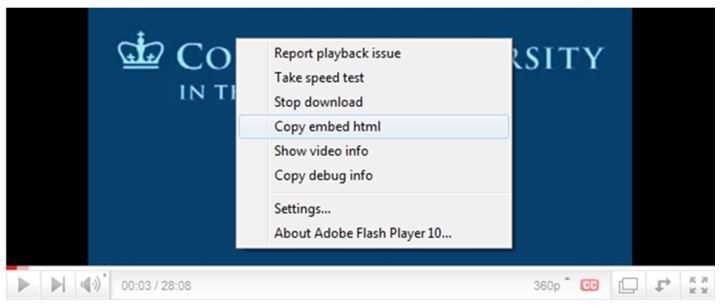
STEP 2: Right click on the video and select "Copy Embed HTML" as shown in the picture below. 
How To Embed Youtube Videos in a BlogPost

STEP 3:  Go to the blogger post, Switch to HTML view, Right click and select Paste or just press Ctrl + V.

Thats that. You now have a video embedded in your blog post


Monday, 12 November 2012

Create A Stylish 404 Error Page

As usual, i was surfing the internet and i came across this useful post by a friend and fellow blogger, Durodola Ridwan, a blogger at http://www.realcombiz.com. He spoke about how to create custom blogger 404 error pages and i felt the need to share it with you guys. As we all know, the default error page appears in only plain text surrounded by a grey box which look so much ugly, so he has created two awesome 404 error page which will override the existing style sheet for the error page.

404 ERROR STYLE 1


STEP 1

  • Go to your blogger dashboard
  • Click on "Design" > "Edit HTML" (Old blogger interface)
  • Click on "Template" > "Edit HTML" > "Proceed" (New blogger interface)
  • Use ctrl F to find ]]></b:skin> and paste the following code after/below ]]></b:skin>
<b:if cond='data:blog.pageType == &quot;error_page&quot;'>

<style type='text/css'>

.status-msg-wrap {

    font-size: 100%;

    margin: none;

    position: static;

    width: 100%;

}

.status-msg-border {

    display:none

}

.status-msg-body {

    padding: none;

    position: static;

    text-align: inherit;

    width: 100%;

    z-index: auto;

}

.status-msg-wrap a {

    padding: none;

    text-decoration: inherit;

}

.RB-404-box {

  background:#FFFFFF;

  width:98%;

  margin:10px 0px;

  padding:20px 10px;

  border:1px solid #ddd;

  -moz-border-radius:6px;

  -webkit-border-radius:6px;

  border-radius:6px;

  box-shadow: 5px 5px 5px #CCCCCC;

}

</style>

</b:if>
Simply edit #FFFFFF if you want to change the background colour of the box and click Save template.

 STEP 2

  • Now go to "Settings" > "Search preferences" 
  • Click on Edit link next to Custom Page Not Found
  • Copy and paste the following code in the content box
<!-- 404 Error Page By www.realcombiz.com -->

<div class='RB-404-box'>

  <p align='center'><span style="color: red; font-family: 
Georgia, 'Times New Roman', serif;"><span style="font-size: 150px;
 line-height: 
18px;"><b>404</b></span></span></p>

  <p align='center'><span style="color: #0080ff; font-family: 
Georgia, 'Times New Roman', serif;"><span style="font-size: 150px;
 line-height: 18px;"><b><br 
/></b></span></span></p>

  <p align='center'><span style="color: #0080ff; font-family: 
Georgia, 'Times New Roman', serif;"><span style="font-size: 150px;
 line-height: 
18px;"><b>Error</b></span></span></p>

  <p align='center'>

<br />

  <p align='center'>

<br />

  <p align='center'>

<b><span style="font-size: x-large;">Page Not Found!!!</span></b></p>

<br />

  <p align='center'>

<a href="LINK TO YOUR HOME PAGE"><img border="0" 
src="https://blogger.googleusercontent.com/img/b/R29vZ2xl/AVvXsEiAx_MFTGTo7yyTopRrAXuOxCHotebFzWYebrNAa5VzRzLWHa56Fj6RzKsvigq_Xn9pkZrqXCXCFQb_f8fs_9PxlhxFpfySu6Z7YkHdQAcB3wgx00QRp45JCMzkNQCGgna92kCVgioR01wb/s1600/home+button+2.jpg"
 /></a>

<a href="LINK TO YOUR CONTACT PAGE"><img 
border="0" 
src="https://blogger.googleusercontent.com/img/b/R29vZ2xl/AVvXsEg2bebs_vAceCjjl7J5mKGU2Y11_r7KrwAeyqVk3nzH6Cj8T7OiuIpEwH0-ewChBO1Uw9wyhfnOISKiLdCglKLwPJH-RBrf4vIZVBoWt8rX4FkiLPWpvLsWl8I1TTujmjKPtpLT4BbKhADu/s1600/contact+button+2.jpg"
 /></a></p></div>  
Click on Save changes.

404 ERROR STYLE 2

 STEP 1

  • Go to your blogger dashboard
  • Click on "Design" > "Edit HTML" (Old blogger interface)
  • Click on "Template" > "Edit HTML" > "Proceed" (New blogger interface)
  • Use ctrl F to find ]]></b:skin> and paste the following code after/below ]]></b:skin>
<b:if cond='data:blog.pageType == &quot;error_page&quot;'>

<style type='text/css'>

.status-msg-wrap {

    font-size: 100%;

    margin: none;

    position: static;

    width: 100%;

}

.status-msg-border {

    display:none

}

.status-msg-body {

    padding: none;

    position: static;

    text-align: inherit;

    width: 100%;

    z-index: auto;

}

.status-msg-wrap a {

    padding: none;

    text-decoration: inherit;

}

.RB-404-box {

  background:#FFFFFF;

  width:98%;

  margin:10px 0px;

  padding:20px 10px;

  border:1px solid #ddd;

  -moz-border-radius:6px;

  -webkit-border-radius:6px;

  border-radius:6px;

  box-shadow: 5px 5px 5px #CCCCCC;

}

</style>

</b:if>  
To change the background colour, then edit #FFFFFF.

STEP 2

  • Now go to "Settings" > "Search preference" 
  • Click on Edit link next to Custom Page Not Found
  • Copy and paste the following code in the content box
<!-- 404 Error Page By www.realcombiz.com -->

<div class='RB-404-box'>

  <p align='center'><font color='#b60000' style='font-size: 
160px'><strong>404</strong></font></p>

  <p>&#160;</p>

  <p align='center'/>

  <p align='center'><font size='5'>Page Not Found!</font></p>

  <p style='line-height: 30px'><strong>

<font color='#ff0000' size='5'>

Whoops!

</font> <font color='#666666'>

Looks like you either clicked a broken link or a Page that no more exits. Kindly do one of the followings:

</font></strong></p>

  <ol style='line-height: 25px'>

    <li><a href='javascript:history.go(-1)'>&#171; Go Back</a> </li>

    <li>Report the Problem to us by Clicking <a 
href='http://www.realcombiz.com/p/contact_13.html'>Clicking 
here</a>&#160;&#160;&#160; (<em>This will help 
us serve you even better</em>) </li>

    <li>Go To Homepage by <a href='http://www.realcombiz.com'>Clicking Here</a>

      </li>

  </ol></div>  

Click Save changes, and you are done. To confirm that the error is working, simply type a page that does not exist on your blog like http://www.yourblogurl.com/anytexthere.

We'll working on bringing you more custom 404 error pages.So if you have any suggestions as to what the pages should look like, then drop them in the comments box
Related Posts Plugin for WordPress, Blogger...
 
Blogger Widgets Twitter Bird Gadget